
Integrating Supertab with Blox (TownNews)
To use Supertab with your existing Blox paywall we will:
- Create a new Block which will contain the Supertab.js code and entitlement checks.
- Create a new Custom Javascript Method to be used in the Offer Access Group to confirm entitlements from either Supertab or Blox
- Create a new Manual Offer (with a link) for the purchase button in the paywall.
Prerequisites
You will need:
Supertab.js Block
For every page/section where you would like to have Supertab enabled, we will need to load Supertab.js. This will allow the custom javascript (for the purchase button) and entitlement checks to work properly.
- In Design/Blocks, create a new HTML block.
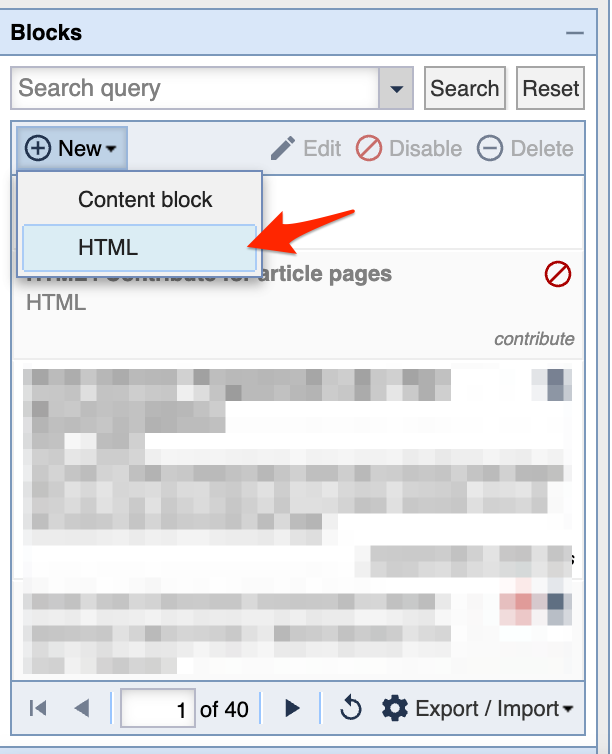
- Use the following HTML/Javascript code in the Block configuration. Be sure to update the
CLIENT_IDandEXPERIENCE_ID.
<script type="module">
  import { Supertab } from "https://js.supertab.co/v3/supertab.js";
  window.Supertab = Supertab;

  const CLIENT_ID = "YOUR_CLIENT_ID";
  const EXPERIENCE_ID = "YOUR_EXPERIENCE_ID";

  // Nag Mode: default deny until proven entitled
  if (localStorage.getItem("st_entitled") === null) {
    localStorage.setItem("st_entitled", "0");
  }

  const st = new Supertab({ clientId: CLIENT_ID });

  // Paywall entitlement check

  (async () => {
    try {
      const { initialState } = await st.createPaywall({ experienceId: EXPERIENCE_ID });
      const entitled = !!initialState?.priorEntitlement;
      const prev = localStorage.getItem("st_entitled");
      const next = entitled ? "1" : "0";
      localStorage.setItem("st_entitled", next);
      if (prev !== "1" && next === "1") location.reload();
    } catch (err) {
      console.warn("[Supertab] createPaywall failed (fail-closed)", err);
    }
  })();

  // Manual Offer multi-offer purchase flow (Safari-safe)

  // Cache resolved purchase objects per offeringId
  const purchaseCache = new Map(); // offeringId -> purchaseObj
  const warming = new Set();       // offeringId currently warming

  function parseOfferingIdFromHash(hash) {
    // Expect: #supertab-buy=offering....
    if (!hash) return null;
    const h = hash.startsWith("#") ? hash.slice(1) : hash;
    if (!h.startsWith("supertab-buy=")) return null;
    const offeringId = decodeURIComponent(h.slice("supertab-buy=".length));
    return offeringId && offeringId.startsWith("offering.") ? offeringId : null;
  }

  function getOfferingIdFromLink(a) {
    try {
      // Use URL parser so we get hash reliably even with full URLs + query params
      const u = new URL(a.href, window.location.href);
      return parseOfferingIdFromHash(u.hash);
    } catch {
      // Fallback: parse raw href
      const idx = a.href.indexOf("#");
      if (idx === -1) return null;
      return parseOfferingIdFromHash(a.href.slice(idx));
    }
  }

  function killEvent(e) {
    e.preventDefault();
    e.stopPropagation();
    if (typeof e.stopImmediatePropagation === "function") e.stopImmediatePropagation();
  }

  function warmOffering(offeringId) {
    if (purchaseCache.has(offeringId) || warming.has(offeringId)) return;
    warming.add(offeringId);

    const purchaseMetadata = {
      source: "blox_manual_offer",
      offeringId,
      path: location.pathname,
      title: document.title,
      url: window.location.href
    };

    st.createPurchase({ offeringId, purchaseMetadata })
      .then((purchase) => {
        purchaseCache.set(offeringId, purchase);
      })
      .catch((err) => {
        console.error("[Supertab] createPurchase failed for", offeringId, err);
      })
      .finally(() => {
        warming.delete(offeringId);
      });
  }

  // Warm on hover/touch so the first click is more likely to work in Safari
  document.addEventListener("pointerover", (e) => {
    const a = e.target?.closest?.("a");
    if (!a) return;
    const offeringId = getOfferingIdFromLink(a);
    if (!offeringId) return;
    warmOffering(offeringId);
  }, true);

  // Kill navigation ASAP (Blox sometimes redirects in JS)
  document.addEventListener("pointerdown", (e) => {
    const a = e.target?.closest?.("a");
    if (!a) return;
    const offeringId = getOfferingIdFromLink(a);
    if (!offeringId) return;
    killEvent(e);
    // start warming immediately in case it wasn't warmed yet
    warmOffering(offeringId);
  }, true);

  // Actual click -> start purchase (must be synchronous)
  document.addEventListener("click", (e) => {
    const a = e.target?.closest?.("a");
    if (!a) return;

    const offeringId = getOfferingIdFromLink(a);
    if (!offeringId) return;

    killEvent(e);

    const purchaseObj = purchaseCache.get(offeringId);
    if (!purchaseObj) {
      console.warn("[Supertab] Purchase not ready yet for", offeringId, "— click again.");
      warmOffering(offeringId);
      return;
    }

    // IMPORTANT: no awaits before this call
    purchaseObj.startPurchase()
      .then((result) => {
        if (result?.priorEntitlement || result?.purchase?.status === "completed") {
          localStorage.setItem("st_entitled", "1");
          location.reload();
          return;
        }
        localStorage.setItem("st_entitled", "0");
      })
      .catch((err) => {
        console.error("[Supertab] startPurchase failed for", offeringId, err);
      });

  }, true);
</script>
- Update the Block configuration as required and hit "save".
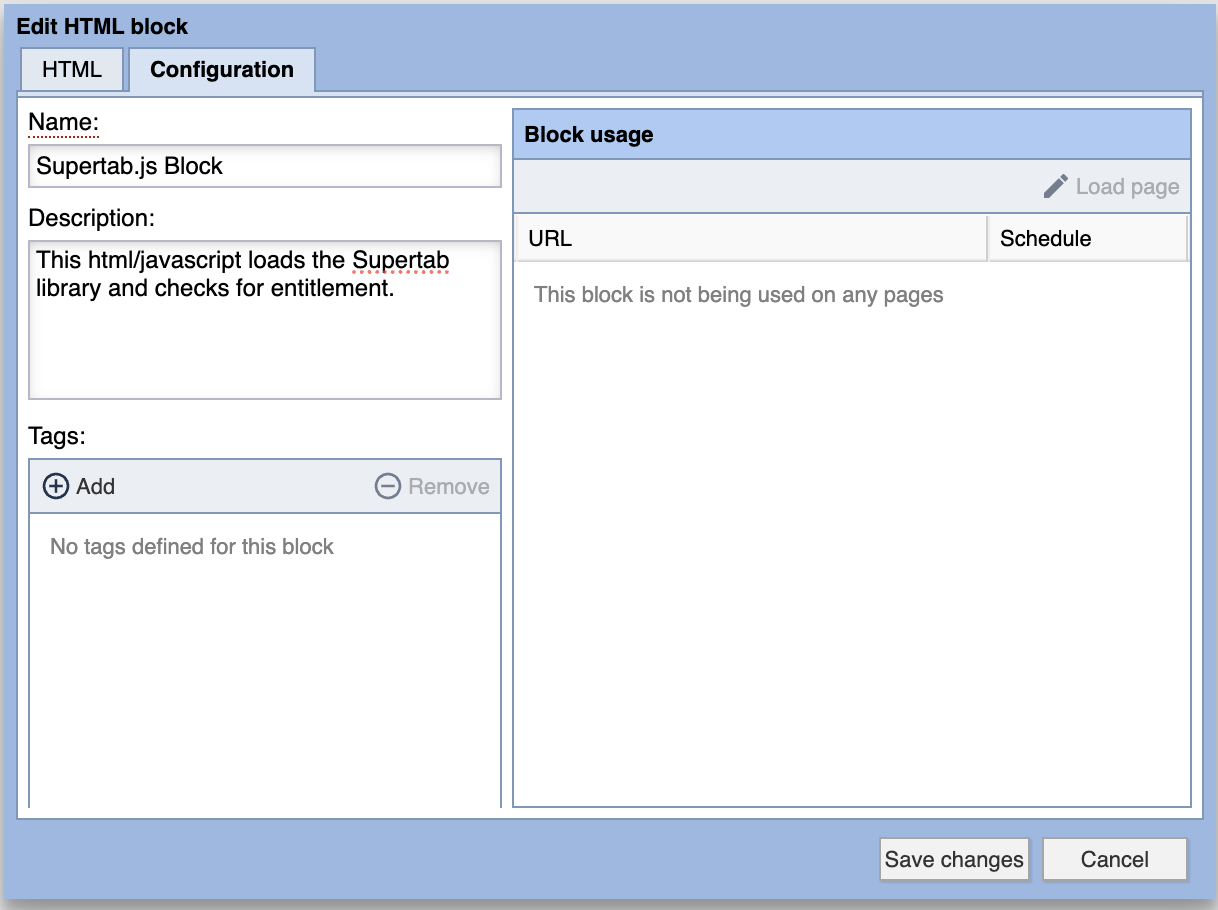
- In the Design/Blocks editor, place this new Blocks on the site sections or pages where you would like to enable the Supertab option on your paywall. For best performance include this block as closest to the top of the page as possible.
Custom Javascript Module (Community/Access Control)
- In Blox open the Community/Access Control panel. Select the gear icon on the top left, and select "Custom Javascript Methods"
- Click on "new", select the "Enabled" option, set an appropriate name, and use the following javascript, click "save".
return {
  has_access:
    (window.TNCMS &&
     TNCMS.User &&
     TNCMS.User.hasFullAccess &&
     TNCMS.User.hasFullAccess() === true) ||
    localStorage.getItem("st_entitled") === "1"
};
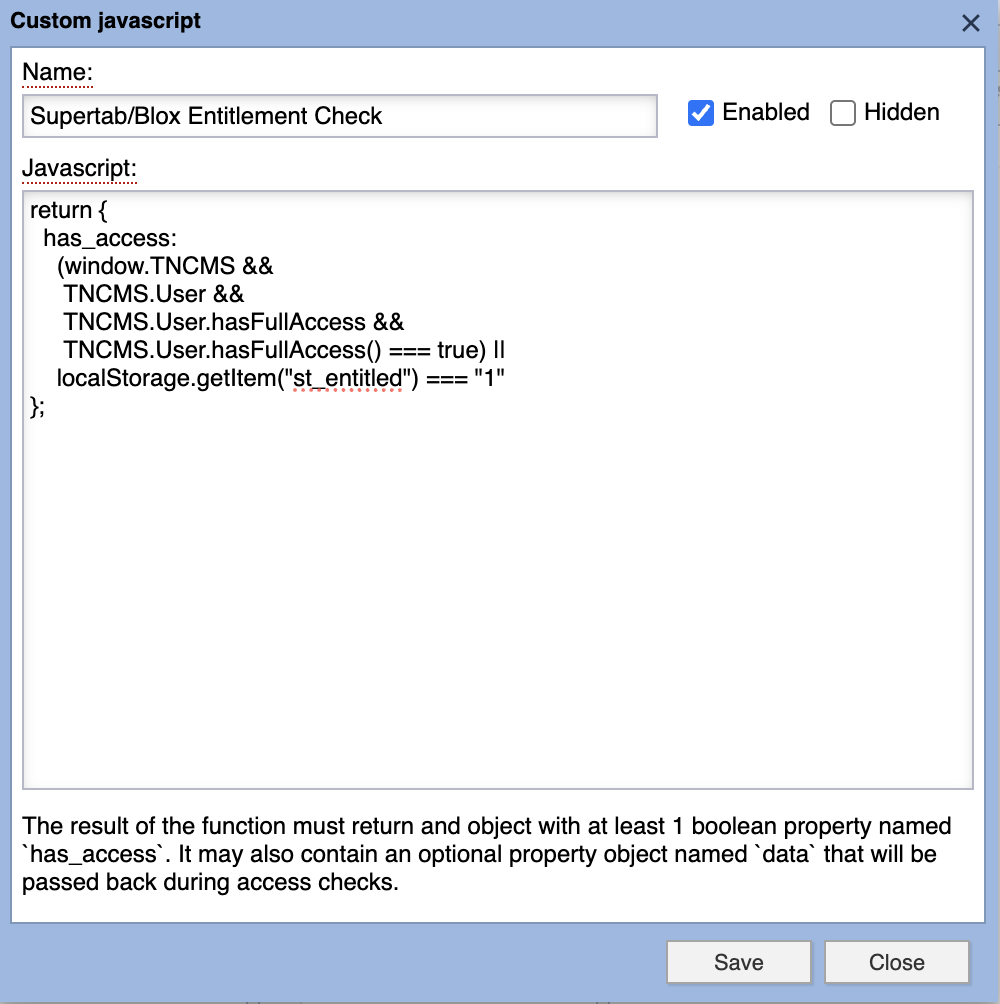
This method will be used in the next step in the "Access method group".
Edit Access Control Rule
- Create a new access rule or edit an existing access rule in Community/Access Control
- In "Access Method Group", click on "Add".
- In the method section click on "Add" and select "Custom Javascript". Select the "Supertab/Blox Entitlement Check" you created in the step above.
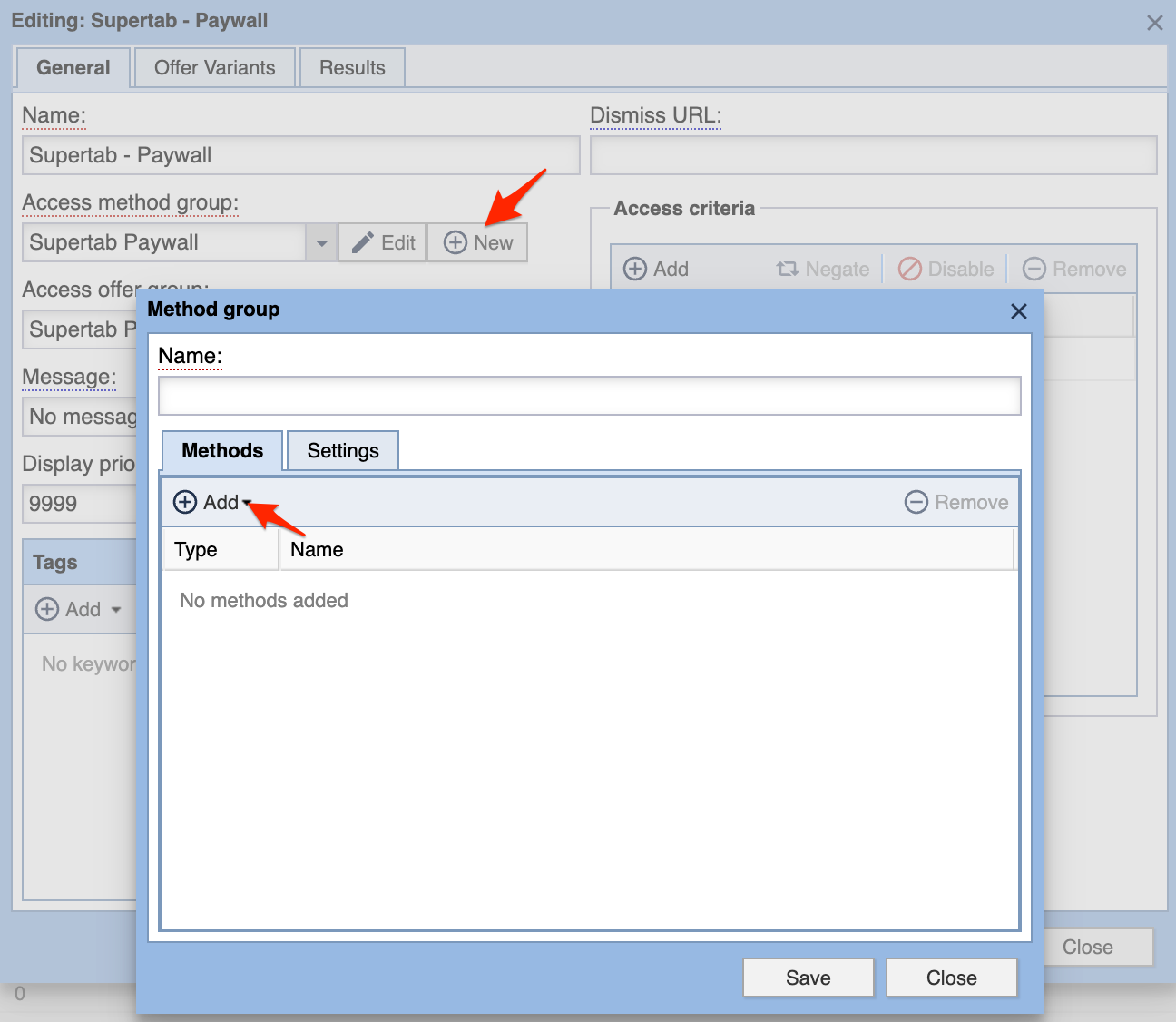
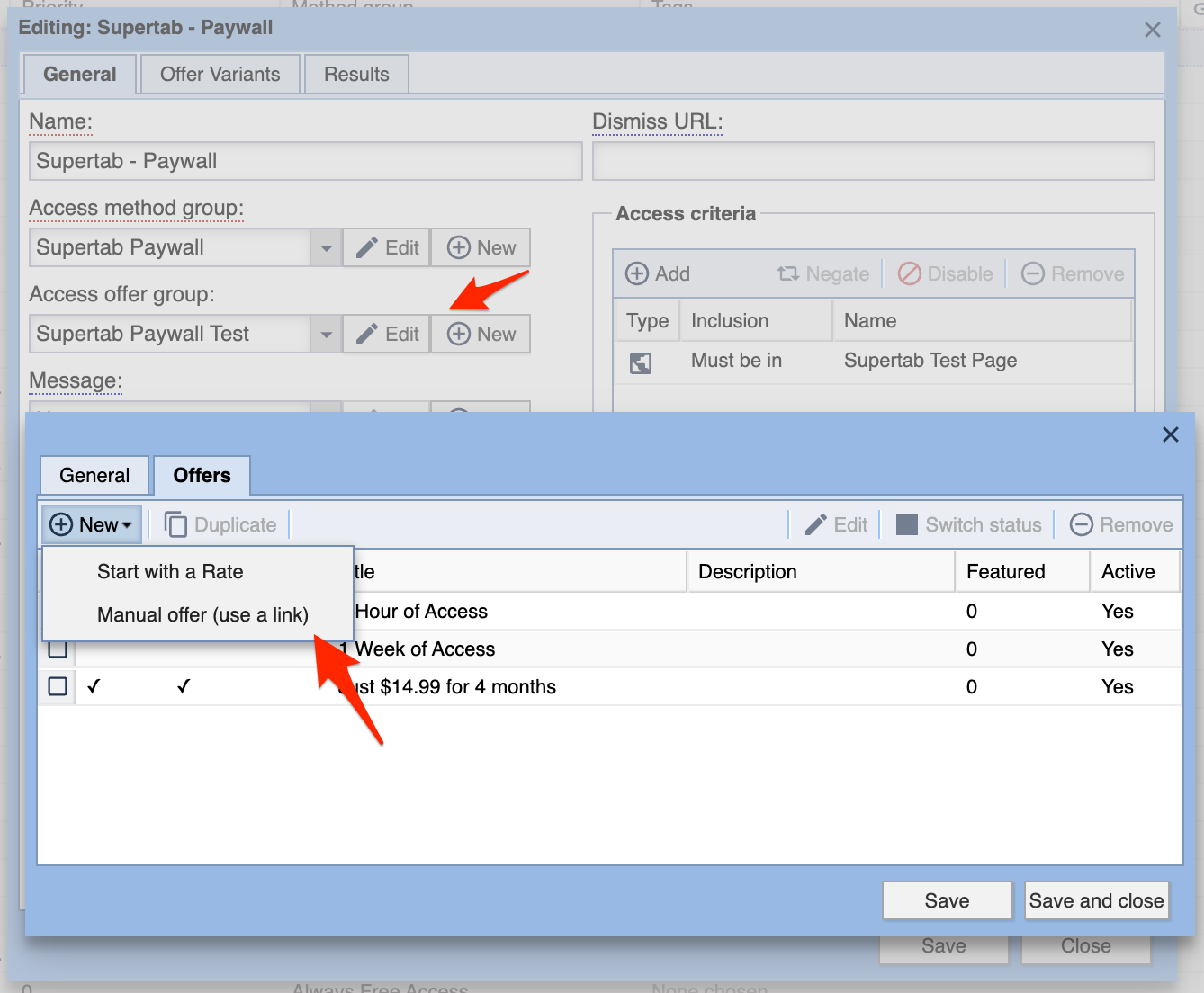
- Next to the "Access offer group". Click on "Edit" or "New".
- In the "Offers" tab, create a new Manual Offer.
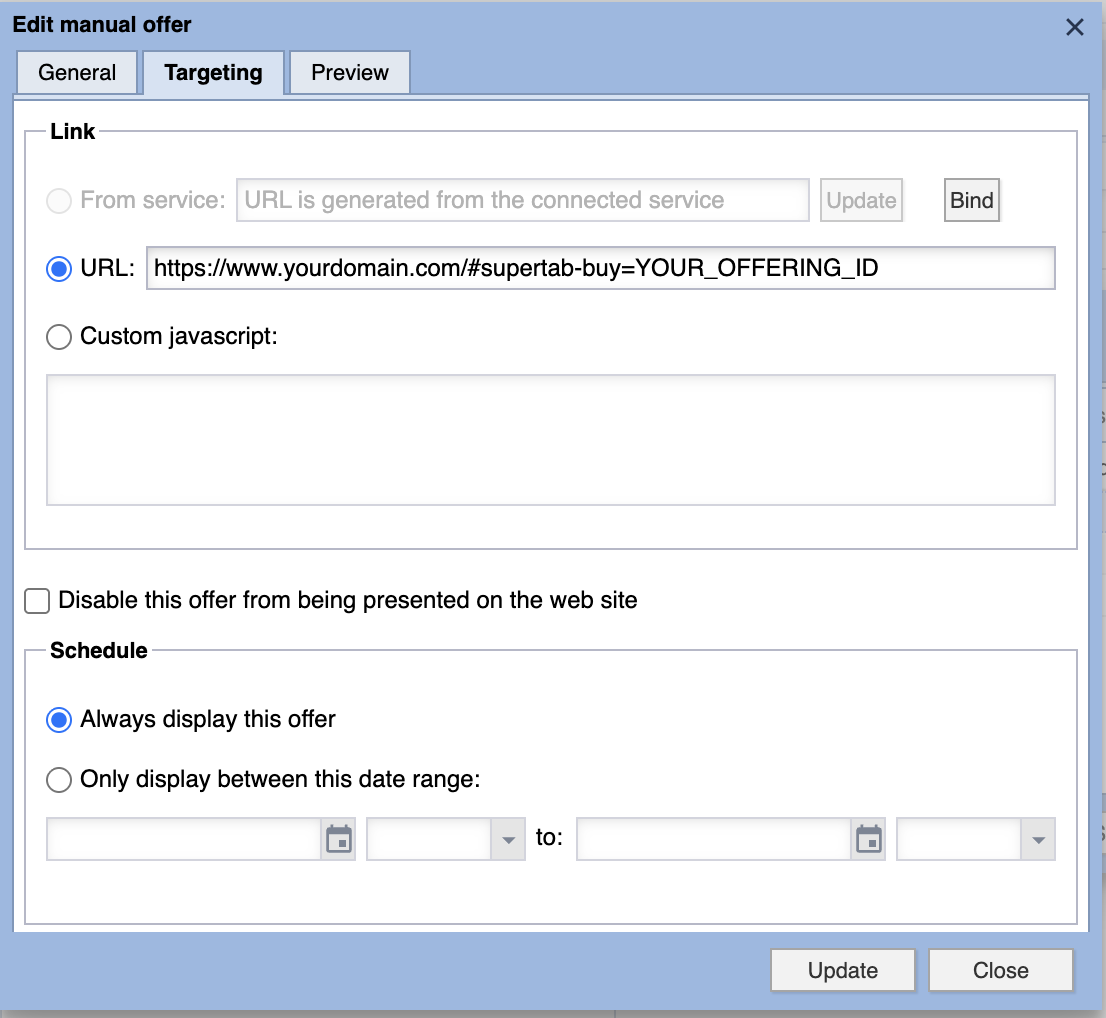
- In the "Targeting" section of the "Edit manual offer" dialog box, select "URL" and use the following address. Make sure to update
YOUR_OFFERING_ID
https://www.yourdomain.com/#supertab-buy=YOUR_OFFERING_ID
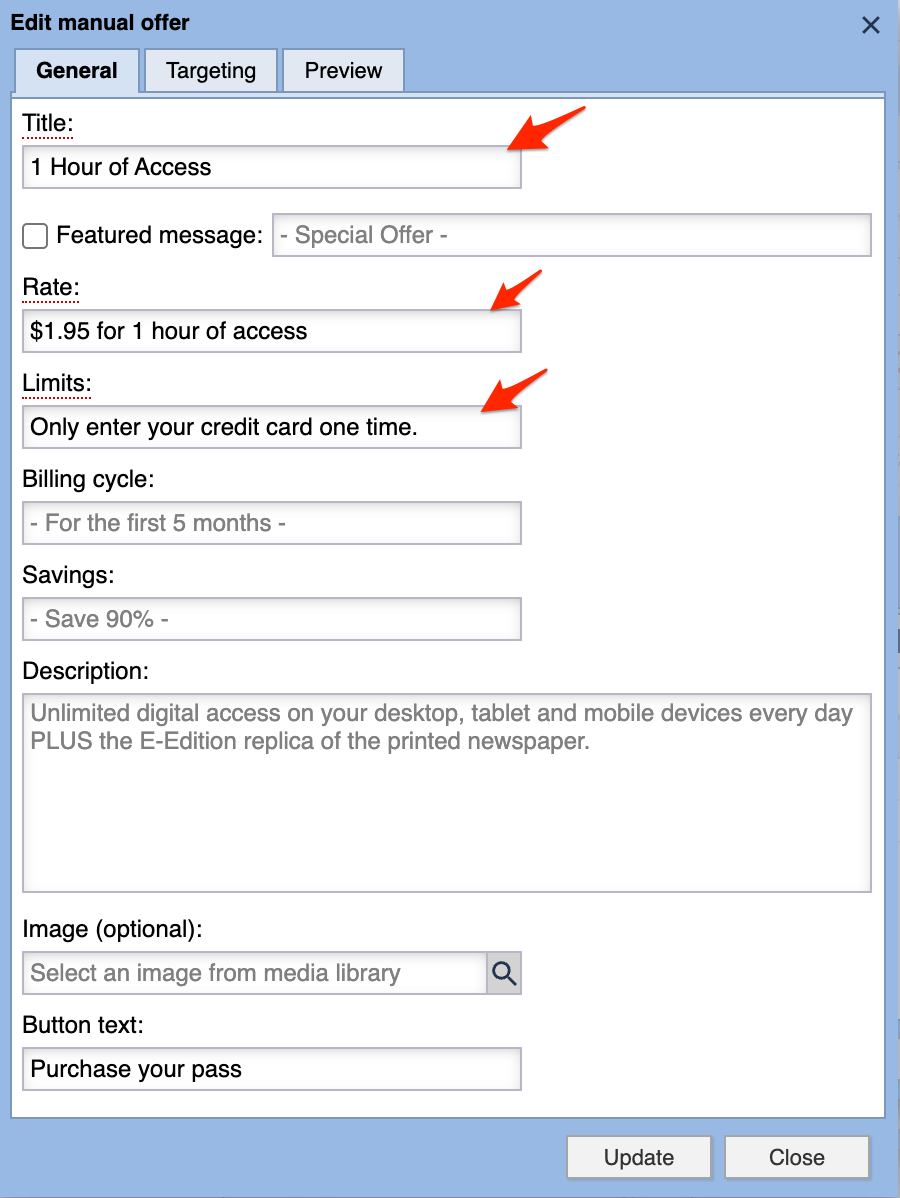
- In the "General" section update the required fields as appropriate. Be sure to match any pricing information with the actual offering price from the Business Portal.
- Click Update
You are welcome to include any other Blox offers for this access control rule. Important: If you want to include the Supertab offer in any other paywalls, don't forget to update the "Access Method Group" to the custom javascript module you created in step 3 above. Otherwise Your paywall may appear regardless if the user has a Supertab entitlement or not.
If you have any other questions or require assistance, please dont hesitate to contact support@supertab.co