
How do I track the progress of a user’s Tab?
You can track the status of a user's tab within the dashboard in the Business Portal.
- Login to the Business Portal. The first screen you see will be your analytics dashboard.
- Scroll down to the "Details" Section
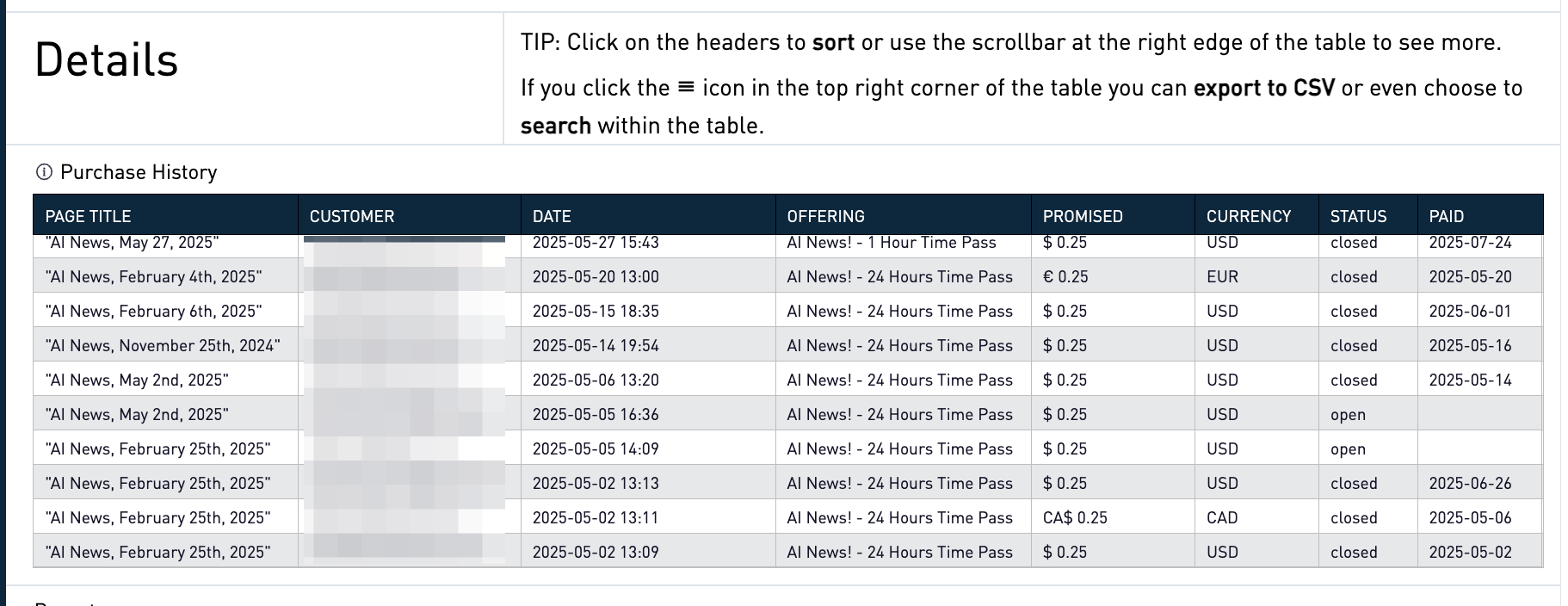
- Page Title: This was the title of the page on your site the user made the purchase from
- Customer: The e-mail address of the user.
- Date: The date the purchase was made
- Offering: The product offering the user purchased (time pass, single item, subscription, etc..)
- Promised: The price of the purchased offering (the amount we promise to pay you when the tab is closed).
- Currency: In which currency the promized amount was charged in.
- Status: The status of the tab for this particular user. "Open" if the amount is still promised to you. "Closed" if we have collected payment for that promised amount.
- Paid: The date the promised amount was paid by the user.
Because the tab is shared by multiple merchants, you may see tab Status of closed even if the user has purchased less than the tab limit. This is because they may have purchased content from other sites.