
How Does The Tab Work?
The Tab lets Supertab bundle your small purchases (micropayments) into a single running total. Once that total reaches a preset threshold, Supertab charges your credit card for the full amount in one transaction. This keeps fees low and checkout simple.
Note: The Tab isn’t a digital wallet; you never have to preload funds. Purchases are tracked automatically and charged only when the tab closes.
Tab Thresholds
Your tab will automatically close and your card will be charged when any of these conditions are met:
- First tab: Once it reaches $1 USD (or equivalent).
- Second and later tabs: Once it reaches $5 USD (or equivalent).
- 30-day rule: If your tab is 30 days old and worth $1 USD or more, and your card is already on file.
If you try to add an item that pushes your balance past a closing threshold, you’ll be prompted to pay off the current tab before continuing.
Account and Tracking
To ensure accurate tracking of your purchases, you’ll need to log in or create a Supertab account.
Once logged in, your session is stored locally in your browser (not as a cookie). Any future purchases on participating sites will be added to your open tab automatically and no repeated logins required.
Tab States
A Tab can exist in one of two states:
- Open: The tab is still active and can accept new items (its threshold hasn’t been reached).
- Closed: The tab has hit its threshold and payment has been processed.
How Payment Promises Work
When a user adds an item to their tab, Supertab “promises” to pay the merchant the item’s value (minus fees) once the tab closes.
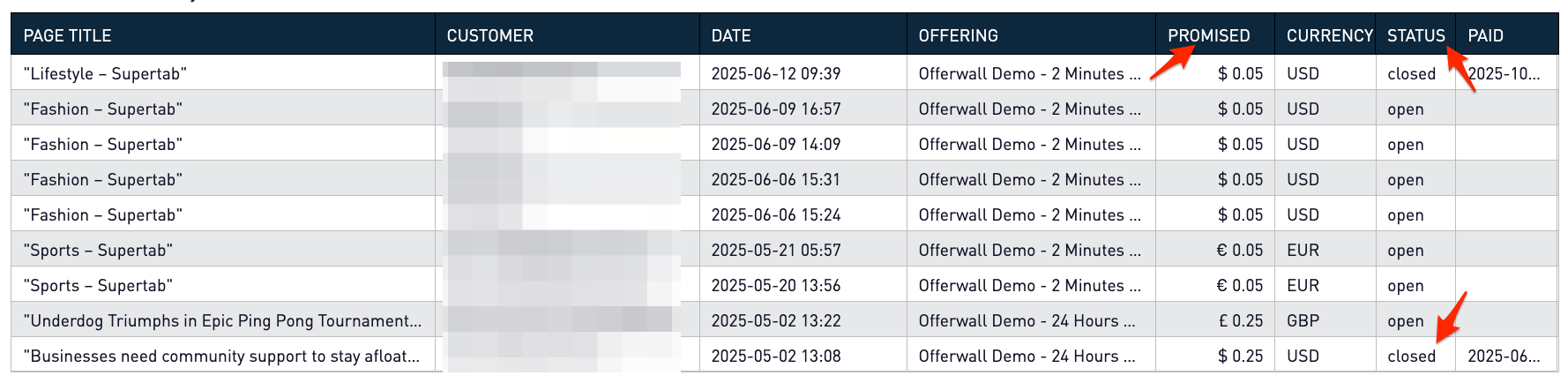
Example:
A first-time user adds a $0.25 item to their tab. Because the first tab closes at $1, the user can add up to $0.75 more before it’s charged. During this time, the tab remains open, and Supertab promises to pay the merchant $0.25 once the tab closes.
When the total hits $1, the tab closes, the card is charged, and payment is sent to the merchant.
The 30 Day Rule
Each open tab has a maximum lifetime of 30 days. This means that even if your tab hasn’t yet reached its dollar threshold, Supertab will automatically close it once it’s 30 days old. As long as the total is $1 USD or more and we already have your payment method on file.
The 30-day rule ensures that merchants are paid in a timely manner, and users don’t forget about small purchases sitting on their tab.
Example:
Let’s say you open a tab on June 1 and make a few small purchases totalling $1.35. If you haven’t added anything else by July 1, Supertab will automatically close the tab on that day, charge your saved credit card $1.35, and pay the merchants accordingly.
If your tab’s total is less than $1 when it reaches 30 days, it simply stays open until either:
- You add enough purchases to reach the minimum charge amount, or
- You make another purchase that triggers the threshold.
Aggregating Purchases Across Merchants
Supertab combines purchases made across all participating merchants into a single tab. You don’t need to reach the threshold on one specific site. Lll purchases made while your tab is open count toward it.
Example:
If you buy a $0.40 article from NewsDaily.com, a $0.35 recipe from FoodieBlog.net, and a $0.25 podcast from TechTalk.fm, your total tab value becomes $1.00. Once this threshold is reached, your tab closes, the credit card is charged $1.00, and each merchant receives payment for their portion.